 9:39 PM
 zenon
zenon
Why a Computer History Museum?
Humans have been creating tools since before recorded history. For many centuries, most tools served to amplify the power of the human body. We call the period of their greatest flowering the Industrial Revolution.
In the last 150 years we have turned to inventing tools that amplify the human mind, and by doing so we are creating the Information Revolution. At its core, of course, is computing.
Humans have been creating tools since before recorded history. For many centuries, most tools served to amplify the power of the human body. We call the period of their greatest flowering the Industrial Revolution.
In the last 150 years we have turned to inventing tools that amplify the human mind, and by doing so we are creating the Information Revolution. At its core, of course, is computing.
“Computer” was once a job title. Computers were people: men and women sitting at office desks performing calculations by hand, or with mechanical calculators. The work was repetitive, slow, and boring. The results were often unreliable.
In the mid 1800s, the brilliant but irascible Victorian scientist Charles Babbage contemplated an error-filled book of navigation tables and famously exclaimed, “I wish to God these calculations had been executed by steam!” Babbage designed his Difference Engine to calculate without errors, and then, astoundingly, designed the Analytical Engine — a completely programmable computer that we would recognize as such today. Unfortunately he failed to build either of those machines.
Automatic computation would have to wait another hundred years. That time is now.
the father of computer:
Bioraphy and Education
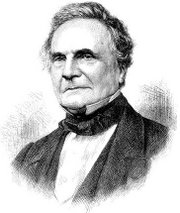 Charles Babbage was born in London Dec. 26, 1791, St. Stephan day, in London. He was son of Benjamin Babbage, a banking partner of the Praeds who owned the Bitton Estate in Teignmouth and Betsy Plumleigh Babbage. It was about 1808 when the Babbage family decided to move into the old Rowdens house, located in East Teignmouth, and Benjamin Babbage became a warden of the nearby church of St. Michael.
The father of Charles was a rich man, so it was possible for Charles to receive instruction from several elite schools and teachers during the course of his elementary education. He was about eight when he had to move to a country school to recover from a dangerous fever. His parents sentenced that his "brain was not to be taxed too much"; Babbage wrote: "this great idleness may have led to some of my childish reasonings."
Then, he joined King Edward VI Grammar School in Totnes, South Devon, a thriving comprehensive school that's still operative today, but his fragile health status forced him back to private teaching for a period. Then, he finally joined a 30-student closed number academy managed by Reverend Stephen Freeman. The academy had a big library, where Babbage used to study mathematics by himself, and learned to love it. He had two more personal tutors after leaving the academy. One was a clergyman of Cambridge, and about him Babbage said: "I fear I did not derive from it all the advantages that I might have done.". The other one was an Oxford tutor who teached Babbage the Classics, so that he could be accepted to Cambridge.
Babbage arrived at Trinity College, Cambridge in October 1810. He had a big culture - he knew Lagrange, Leibniz, Lacroix, Simpson... and he was seriously disappointed about the math programs available at Cambridge. So he, with J.Herschel, G.Peacock, and other friends, decided to form the Analytical Society.
When, in 1812, Babbage transferred to Peterhouse, Cambridge, he was the best mathematician; but he failed to graduate with honours.
He received an honorary degree later, without even being examinated, in 1814.
In 1814, Charles Babbage married Georgiana Whitmore at St. Michael's Church in Teignmouth, Devon. His father, for some reason, never gave his approvation. They lived in tranquility at 5 Devonshire Street, Portland Place, London.
Only Three of their 8 children became adult.
Tragically, Charles' father, his wife and one of his sons all died in 1827.
Children
- Benjamin Herschel Babbage (1815)
- Charles Whitmore Babbage (1817)
- Georgiana Whitmore Babbage (1818)
- Edward Stewart Babbage (1819)
- Francis Moore Babbage (1821)
- Dugald Bromheald Babbage (1823)
- Henry Prevost Babbage (1824)
- Alexander Forbes Babbage (1827)
- Timothy grant Babbage (1829)
Design of computers
In Babbage's times there was a really high error rate in the calculation of math tables, when Babbage planned to find a new method that could be use to make it mechanically, removing the human error factor. This idea started to tickle his brain very early, in 1812.Three different elements influenced him in this decision: he disliked untidiness and unprecision; he was very able with logarithmical tables; he was inspired from an existing work on calculating machines produced by W. Schickard, B.Pascal, and G. Leibniz.
He discussed the main principles of a calculating engine in a letter he wrote to Sir H. Davy in the early 1822.
Difference engine
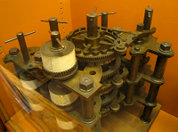 Babbage presented something that he called "difference engine" to the Royal Astronomical Society on Jun 14, 1822 and in a paper entitled "Note on the application of machinery to the computation of astronomical and mathematical tables."
It was able to calculate polynomials by using a numerical method called the differences method.
The Society approved the idea, and the government granted him £1500 to construct it, in 1823.
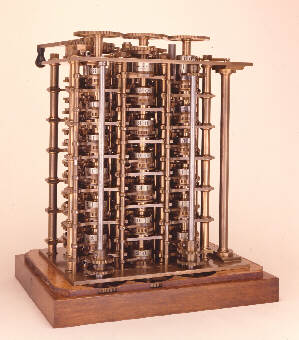 Charles Babbage converted one of the rooms in his home to a workshop and hired Joseph Clement to oversee construction of the engine. Every part had to be formed by hand using custom machine tools, many of which Babbage himself designed. He took extensive tours of industry to better understand manufacturing processes. Based on these trips and his experience with the difference engine, Babbage published On the Economy of Machinery and Manufacture in 1832. It was the first publication on what we would now call operations research.
The death of Georgiana, Babbage's father, and an infant son interrupted construction in 1827. Work had already taxed Babbage heavily and he was on the edge of a breakdown. John Herschel and several other friends convinced Babbage to take a trip to Europe to recuperate. He passed through the Netherlands, Belgium, Germany, and Italy visiting universities and manufacturing facilities.
In Italy he learned he had been named the Lucasian Professor of Mathematics. He initially wanted to turn down the position but several friends convinced him to accept. He moved to 1 Dorset Street upon returning to England in 1828.
The difference engine project had come under fire during Babbage's absence. Rumours had spread that Babbage had wasted the government's money; that the machine did not work; and that it had no practical value if it did. John Herschel and the Royal Society publicly defended the engine. The government continued its support, advancing £1500 on April 29, 1829, £3000 on December 3, and £3000 on February 24, 1830. Work continued, but Babbage would have continual difficulty getting money from the treasury.
Babbage's problems with the treasury coincided with numerous disagreements with Clement. Babbage had built a two-story, 50 foot long workshop behind his house. It had a glass roof for lighting, and a fireproof, dust-free room to contain the machine. Clement refused to move his operations to the new workshop and demanded more money for the difficulty of travelling across town to oversee construction. In response, Babbage suggested that Clement draw his pay directly from the treasury. Before then, Babbage would get money from the government that he would use to pay Clement. He often had to pay Clement out of his own pocket when the bureaucracy lagged behind Clement's pay schedule. Clement refused the request and stopped working.
Clement further refused to turn over the drawings and tools used to build the difference engine. After an investment of £23000, including £6000 of Babbage's own money, work on the unfinished machine ceased in 1834. Charles wrote, "The drawings and parts of the Engine are at length in a place of safety—I am almost worn out with disgust and annoyance at the whole affair." In 1842 the government officially abandoned the project.
Analytical engine
While he was separated from the difference engine, Babbage began to think about an improved calculating engine. Between 1833 and 1842 he tried to build a machine that would be programmable to do any kind of calculation, not just ones relating to polynomial equations. The first breakthrough came when he redirected the machine's output to the input for further equations. He described this as the machine "eating its own tail". It did not take much longer for him to define the main points of his analytical engine.The mature analytical engine used punched cards adapted from the Jacquard loom to specify input and the calculations to perform. The engine consisted of two parts: the mill and the store. The mill, analogous to a modern computer's CPU, executed the operations on values retrieved from the store, which we would consider memory. It was the world's first general-purpose computer.
A design for this emerged by 1835. The scale of the work was truly incredible. Babbage and a handful of assistants created 500 large design drawings, 1000 sheets of mechanical notation, and 7000 sheets of scribbles. The completed mill would measure 15 feet tall and 6 feet in diameter. The 100 digit store would stretch to 25 feet long. Babbage constructed only small test parts for his new engine; a full engine was never completed. In 1842, following repeated failures to obtain funding from the First Lord of the Treasury, Babbage approached Sir Robert Peel for funding. Peel refused, and offered Babbage a knighthood instead. Babbage refused. He would continue modifying and improving the design for many years to come.
In October 1842, Federico Luigi, Conte Menabrea, an Italian general and mathematician, published a paper on the analytical engine. Augusta Ada King, Countess of Lovelace, a longtime friend of Babbage, translated the paper into English. Charles suggested that she add notes to accompany the paper. In a series of letters between 1842 and 1843, the pair collaborated on seven notes, the combined length of which was three times longer than the actual paper. In one note Ada prepared a table of execution for a program that Babbage wrote to calculate the Bernoulli numbers. In another, she wrote about a generalized algebra engine that could perform operations on symbols as well as numbers. Lovelace was perhaps the first to grasp the more general goals of Babbage’s machine, and some consider her the world's first computer programmer. She began work on a book describing the analytical engine in more detail, but it was never finished.
Second Difference Engine
Between October 1846 and March 1849 Babbage started designing a second difference engine using knowledge gained from the analytical engine. It used only about 8000 parts, three times fewer than the first. It was a marvel of mechanical engineering.Unlike the analytical engine that he continually tweaked and modified, he did not try to improve the second difference engine after completing the initial design. Babbage made no attempt to actually construct the machine.
The 24 schematics remained in the Science Museum archives until a full-size replica was built 1985-1991 to celebrate the 200th anniversary of Babbage’s birth. It measured 11 feet long, 7 feet high and 18 inches deep, and weighted 2.6 tonnes. The limits of precision were restricted to those achievable by Babbage.
Babbage's accomplishments
In 1824 Babbage won the Gold Medal of the Royal Astronomical Society "for his invention of an engine for calculating mathematical and astronomical tables".From 1828 to 1839 Babbage was Lucasian professor of mathematics at Cambridge. He contributed largely to several scientific periodicals, and was instrumental in founding the Astronomical Society in 1820 and the Statistical Society in 1834.
In 1837, responding to the official eight Bridgewater Treatises "On the Power, Wisdom and Goodness of God, as manifested in the Creation", he published his Ninth Bridgewater Treatise putting forward the thesis that God had the omnipotence and foresight to create as a divine legislator, making laws (or programs) which then produced species at the appropriate times, rather than continually interfering with ad hoc miracles each time a new species was required. The book incorporated extracts from correspondence he had been having with John Herschel on the subject.
Charles Babbage also achieved notable results in cryptography. He broke Vigenère's autokey cipher as well as the much weaker cipher that is called Vigenère cipher today. The autokey cipher was generally called "the undecipherable cipher", though owing to popular confusion, many thought that the weaker polyalphabetic cipher was the "undecipherable" one. Babbage's discovery was used to aid English military campaigns, and was not published until several years later; as a result credit for the development was instead given to Friedrich Kasiski, who made the same discovery some years after Babbage.
Babbage also invented the pilot (also called a cow-catcher), the metal frame attached to the front of locomotives that clears the tracks of obstacles in 1838. He also performed several studies on Isambard Kingdom Brunel's Great Western Railway.
He only once endeavoured to enter public life, when, in 1832, he stood unsuccessfully for the borough of Finsbury. He came in last in the polls.
Parts of Babbage's uncompleted mechanisms are available for visits in the London Science Museum. In 1991 a difference engine was completed, starting from Babbage's original plans, and it functioned perfectly.
References and Bibliography
- Passages from the Life of a Philosopher (Charles Babbage).
- Charles Babbage: Pioneer of the Computer (Anthony Hyman).
- Irascible Genius: A Life of Charles Babbage, Inventor (Maboth Moseley).
- The Cogwheel Brain (Doron Swade).
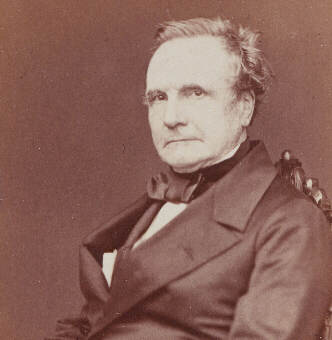 A LUV.IT educational production.
External (unrelated) links: PSP. Games. Grossisti.
This site will tell you Who is Charles Babbage, and you'll find - as well - Pictures of mathematician Charles Babbage and the Charles Babbage computer. Everything about Charles Babbage history and Charles Babbage difference engine models.
If you are asking yourself what did Charles Babbage invent, this is the ultimate place to visit. And a lot of Photos of Charles Babbage! Charles Babbage Inventions.
Interesting references and materials about Charles Babbage.
Contributions:
Written Works:
Written Works:
- A Comparative View of the Various Institutions for the Assurance of Lives (1826)
- Table of Logarithms of the Natural Numbers from 1 to 108, 000 (1827)
- Reflections on the Decline of Science in England (1830)
- On the Economy of Machinery and Manufactures (1832)
- Ninth Bridgewater Treatise (1837)
- Passages from the Life of a Philosopher (1864)
Famous Quote:
"The whole of the developments and operations of analysis are now capable of being executed by machinery. ... As soon as an Analytical Engine exists, it will necessarily guide the future course of science."
The Universal Machine
The computer is one of one of our greatest technological inventions. Its impact is—or will be—judged comparable to the wheel, the steam engine, and the printing press. But here’s the magic that makes it special: it isn’t designed to do a specific thing. It can do anything. It is a universal machine.
Software turns these universal machines into a network of ATMs, the World Wide Web, mobile phones, computers that model the universe, airplane simulators, controllers of electrical grids and communications networks, creators of films that bring the real and the imaginary to life, and implants that save lives. The only thing these technological miracles have in common is that they are all computers.
We are privileged to have lived through the time when computers became ubiquitous. Few other inventions have grown and spread at that rate, or have improved as quickly. In the span of two generations, computers have metamorphosed from enormous, slow, expensive machines to small, powerful, multi-purpose devices that are inseparably woven into our lives.
A “mainframe” was a computer that filled a room, weighed many tons, used prodigious amounts of power, and took hours or days to perform most tasks. A computer thousands of times more powerful than yesterday’s mainframe now fits into a pill, along with a camera and a tiny flashlight. Swallow it with a sip of water, and the “pill” can beam a thousand pictures and megabytes of biomedical data from your vital organs to a computer. Your doctor can now see, not just guess, why your stomach hurts.
The benefits are clear. But why look backward? Shouldn’t we focus on tomorrow?
Software turns these universal machines into a network of ATMs, the World Wide Web, mobile phones, computers that model the universe, airplane simulators, controllers of electrical grids and communications networks, creators of films that bring the real and the imaginary to life, and implants that save lives. The only thing these technological miracles have in common is that they are all computers.
We are privileged to have lived through the time when computers became ubiquitous. Few other inventions have grown and spread at that rate, or have improved as quickly. In the span of two generations, computers have metamorphosed from enormous, slow, expensive machines to small, powerful, multi-purpose devices that are inseparably woven into our lives.
A “mainframe” was a computer that filled a room, weighed many tons, used prodigious amounts of power, and took hours or days to perform most tasks. A computer thousands of times more powerful than yesterday’s mainframe now fits into a pill, along with a camera and a tiny flashlight. Swallow it with a sip of water, and the “pill” can beam a thousand pictures and megabytes of biomedical data from your vital organs to a computer. Your doctor can now see, not just guess, why your stomach hurts.
The benefits are clear. But why look backward? Shouldn’t we focus on tomorrow?
Why Computer History?
History places us in time. The computer has altered the human experience, and changed the way we work, what we do at play, and even how we think. A hundred years from now, generations whose lives have been unalterably changed by the impact of automating computing will wonder how it all happened—and who made it happen. If we lose that history, we lose our cultural heritage.
Time is our enemy. The pace of change, and our rush to reach out for tomorrow, means that the story of yesterday’s breakthroughs is easily lost.
Compared to historians in other fields, we have an advantage: our subject is new, and many of our pioneers are still alive. Imagine if someone had done a videotaped interview of Michelangelo just after he painted the Sistine Chapel. We can do that. Generations from now, the thoughts, memories, and voices of those at the dawn of computing will be as valuable.
But we also have a disadvantage: history is easier to write when the participants are dead and will not contest your version. For us, fierce disagreements rage among people who were there about who did what, who did it when, and who did it first. There are monumental ego clashes and titanic grudges. But that’s fine, because it creates a rich goldmine of information that we, and historians who come after us, can study. Nobody said history is supposed to be easy.
It’s important to preserve the “why” and the “how,” not just the “what.” Modern computing is the result of thousands of human minds working simultaneously on solving problems. It’s a form of parallel processing, a strategy we borrowed to use for computers. Ideas combine in unexpected ways as they built on each other’s work.
Even simple historical concepts aren’t simple. What’s an invention? Breakthrough ideas sometimes seem to be “in the air” and everyone knows it. Take the integrated circuit. At least two teams of people invented it, and each produced a working model. They were working thousands of miles apart. They’d never met. It was “in the air.”
Often the process and the result are accidental. “I wasn’t trying to invent an integrated circuit,” Bob Noyce, co-inventor of the integrated circuit, was quoted as saying about the breakthrough. “I was trying to solve a production problem.” The history of computing is the history of open, inquiring minds solving big, intractable problems—even if sometimes they weren’t trying to.
The most important reason to preserve the history of computing is to help create the future. As a young entrepreneur, the story goes, Steve Jobs asked Noyce for advice. Noyce is reported to have told him that “You can’t really understand what’s going on now unless you understand what came before.”
Technology doesn’t run just on venture capital. It runs on adventurous ideas. How an idea comes to life and changes the world is a phenomenon worth studying, preserving, and presenting to future generations as both a model and an inspiration.
Time is our enemy. The pace of change, and our rush to reach out for tomorrow, means that the story of yesterday’s breakthroughs is easily lost.
Compared to historians in other fields, we have an advantage: our subject is new, and many of our pioneers are still alive. Imagine if someone had done a videotaped interview of Michelangelo just after he painted the Sistine Chapel. We can do that. Generations from now, the thoughts, memories, and voices of those at the dawn of computing will be as valuable.
But we also have a disadvantage: history is easier to write when the participants are dead and will not contest your version. For us, fierce disagreements rage among people who were there about who did what, who did it when, and who did it first. There are monumental ego clashes and titanic grudges. But that’s fine, because it creates a rich goldmine of information that we, and historians who come after us, can study. Nobody said history is supposed to be easy.
It’s important to preserve the “why” and the “how,” not just the “what.” Modern computing is the result of thousands of human minds working simultaneously on solving problems. It’s a form of parallel processing, a strategy we borrowed to use for computers. Ideas combine in unexpected ways as they built on each other’s work.
Even simple historical concepts aren’t simple. What’s an invention? Breakthrough ideas sometimes seem to be “in the air” and everyone knows it. Take the integrated circuit. At least two teams of people invented it, and each produced a working model. They were working thousands of miles apart. They’d never met. It was “in the air.”
Often the process and the result are accidental. “I wasn’t trying to invent an integrated circuit,” Bob Noyce, co-inventor of the integrated circuit, was quoted as saying about the breakthrough. “I was trying to solve a production problem.” The history of computing is the history of open, inquiring minds solving big, intractable problems—even if sometimes they weren’t trying to.
The most important reason to preserve the history of computing is to help create the future. As a young entrepreneur, the story goes, Steve Jobs asked Noyce for advice. Noyce is reported to have told him that “You can’t really understand what’s going on now unless you understand what came before.”
Technology doesn’t run just on venture capital. It runs on adventurous ideas. How an idea comes to life and changes the world is a phenomenon worth studying, preserving, and presenting to future generations as both a model and an inspiration.
History Can Be Fun
Besides—computer history can be fun. An elegantly designed classic machine or a well-written software program embodies a kind of truth and beauty that give the qualified appreciative viewer an aesthetic thrill. Steve Wozniak’s hand-built motherboard for the Apple I is a beautiful painting. The source code of Apple’s MacPaint program is poetry: compressed, clear, with all parts relating to the whole. As Albert Einstein observed, “The best scientists are also artists.”
Engineers have applied incredible creativity to solve the knotty problems of computing. Some of their ideas worked. Some didn’t. That’s more than ok; it’s worth celebrating.
Silicon Valley understands that innovation thrives when it has a healthy relationship with failure. (“If at first you don’t succeed...”) Technical innovation is lumpy. It’s non-linear. Long periods of the doldrums are smashed by bursts of insight and creativity. And, like artists, successful engineers are open to the happy accident.
In other cultures, failure can be shameful. Business failure can even send you to prison. But here, failure is viewed as a possible prelude to success. Many great technology breakthroughs are inspired by crazy ideas that bombed. We need to study failures, and learn from them.
Engineers have applied incredible creativity to solve the knotty problems of computing. Some of their ideas worked. Some didn’t. That’s more than ok; it’s worth celebrating.
Silicon Valley understands that innovation thrives when it has a healthy relationship with failure. (“If at first you don’t succeed...”) Technical innovation is lumpy. It’s non-linear. Long periods of the doldrums are smashed by bursts of insight and creativity. And, like artists, successful engineers are open to the happy accident.
In other cultures, failure can be shameful. Business failure can even send you to prison. But here, failure is viewed as a possible prelude to success. Many great technology breakthroughs are inspired by crazy ideas that bombed. We need to study failures, and learn from them.
Where are all the museums?
Given the impact of computing on the human experience, it’s surprising that the Computer History Museum is one of very few institutions devoted to the subject.
There are hundreds of aircraft, railroad, and automobile museums. There are only a handful of computer museums and archives. It’s difficult to say why. Maybe the field is too new to be considered history.
We are proud of the leading role the Computer History Museum has taken in preserving the history of computing. We hope others will join us.
The kernel of our collection formed in the 1970s, when Ken Olsen of the Digital Equipment Corporation rescued sections of MIT’s Whirlwind mainframe from the scrap heap. He tried to find a home for this important computer. No institution wanted it. So he kept it and began to build his own collection around it.
Gordon Bell, also at DEC, joined the effort and added his own collection. Gordon’s wife, Gwen, attacked with gusto the task of building an institution around them. They saw, as others did not, that these early machines were important historical artifacts—treasures—that rank with Gutenberg’s press. Without Olsen and the Bells, many of the most important objects in our collection would have been lost forever.
Bob Noyce would have understood the errand we are on. Leslie Berlin’s book The Man Behind The Microchip tells the story of Noyce’s comments at a family gathering in 1972. He held up a thin silicon wafer etched with microprocessors and said, “This is going to change the world. It’s going to revolutionize your home. In your own house, you’ll all have computers. You will have access to all sorts of information. You won’t need money any more. Everything will happen electronically.”
And it is. We are living in the future he predicted.
The Computer History Museum wants to preserve not just rare and important artifacts and the stories of what happened, but also the stories of what mattered, and why. They are stories of heretics and rebels, dreamers and pragmatists, capitalists and iconoclasts—and the stories of their amazing achievements. They are stories of computing’s Golden Age, and its ongoing impact on all of us. It is an age that may have just begun.
There are hundreds of aircraft, railroad, and automobile museums. There are only a handful of computer museums and archives. It’s difficult to say why. Maybe the field is too new to be considered history.
We are proud of the leading role the Computer History Museum has taken in preserving the history of computing. We hope others will join us.
The kernel of our collection formed in the 1970s, when Ken Olsen of the Digital Equipment Corporation rescued sections of MIT’s Whirlwind mainframe from the scrap heap. He tried to find a home for this important computer. No institution wanted it. So he kept it and began to build his own collection around it.
Gordon Bell, also at DEC, joined the effort and added his own collection. Gordon’s wife, Gwen, attacked with gusto the task of building an institution around them. They saw, as others did not, that these early machines were important historical artifacts—treasures—that rank with Gutenberg’s press. Without Olsen and the Bells, many of the most important objects in our collection would have been lost forever.
Bob Noyce would have understood the errand we are on. Leslie Berlin’s book The Man Behind The Microchip tells the story of Noyce’s comments at a family gathering in 1972. He held up a thin silicon wafer etched with microprocessors and said, “This is going to change the world. It’s going to revolutionize your home. In your own house, you’ll all have computers. You will have access to all sorts of information. You won’t need money any more. Everything will happen electronically.”
And it is. We are living in the future he predicted.
The Computer History Museum wants to preserve not just rare and important artifacts and the stories of what happened, but also the stories of what mattered, and why. They are stories of heretics and rebels, dreamers and pragmatists, capitalists and iconoclasts—and the stories of their amazing achievements. They are stories of computing’s Golden Age, and its ongoing impact on all of us. It is an age that may have just begun.
1960/1970: IBM 7094
For its time, this was a supercomputer. IBM donated one to the Technical University in Copenhagen, where it served as the Campus Computing resource, and also made time available to other universities. This machine had 36 bit words, and I think 32 K words of main memory. The machine was very fast: Only about 3 microseconds per instruction, so rather than let the machine read punched cards and write to the printer, all the jobs and data were read onto magnetic tape and then the output was written to tape. The conversions between tape and paper or cards were done on an IBM1401, which was later replaced with an IBM-360/30 which could accept jobs remotely via modems.The operating system of the 7094 was called IBSYS and lived on a tape drive. It had many compilers, including Fortran II, Fortran IV and COBOL.(A reference manual for the very similar IBM 7090 is here - PDF, 156 pages).
1965/1970: RC-4000
The RC-4000 was the successor to the GIER, but had nothing in common with it. It was a 24-bit machine with a real-time operating system that had interrupts, memory protection and a limited amount of multi-tasking. It was used for many interesting applications, including real-time chemical process control, large databases (telephone directory call-centers) and time-sharing. The operating system was the subject of a fair number of computer science research journal articles, and many of the concepts embodied in it were absorbed into Multics and Unix. The one we used at Univeristy of Copenhagen belonged to the Chemistry department, but time-sharing terminals were found all over the science campus section, where they served other departments until the Univac 1106 arrived.1968/1972: IBM 360
The IBM-360 family of computers ranged from the model 20 minicomputer (which typically had 24 KB of memory) to the model 91 supercomputer which was built for the North American missile defense system. Despite their differences, all these machines had the same user instruction set; on the smaller machines many of the more complex instructions were done in microcode rather than in hardware. For example, machines in the lower midrange did not have multiplier hardware, but the microcode implemented multiplications by repeated addition. It was rumored that the smallest machines did addition by repeated increments!The machines had different operating systems. The smallest machines could not really support an operating system and were often used for specialized applications, where a program was loaded from binary punched cards at startup. The middle range used a system called DOS (not related to MS-DOS) and the higher end system was called OS/360. These were the machines that established 32 bits as the standard for computers.The first IBM-360 I used in Copenhagen was the spooling front-end for the 7094. In 1970, the technical university installed a 360/65, later upgraded to a 360/75. When it came in, it had 1 MB of RAM (magnetic core memory in those days) and a roomful of disk drives, probably adding up to about 200 MB.
Today's S/390 mainframes are direct descendants of the IBM-360 family.
1968/1970: IBM 1130
The IBM-1130 was a mini-computer built in the shape of a desk. The ALU had 16-bit words, and it came with a 1.5 MB hard disk. The DOS had a Fortran-IV compiler, but even though the machine was similarly sized to the GIER, it was much less usable.Eventually, the Niels Bohr Institute decided that it could be used as remote job entry terminal to the IBM computers at the technical university.1965/1970: Univac 1100 Series
The Danish universities decided to install 3 large computers at the three largest univerities, an they wisely chose to get an IBM, an UNIVAC and a Control Data. University of Copenhagen got the Univac, and it was a great system.When the machine was installed, it was a Univac-1106 with 131 K words (of 36 bits), i.e. about 600 KB. About 18 months later, it was upgraded to an 1108 which ran twice as fast. This upgrade consisted in replacing a divide-by-two flip-flop in the system clock circuit by a jumper. We also got more memory, I think we doubled it.This machine served an endless stream of batch jobs from both local and remote card-reader/printer stations plus about 50 interactive display terminals.
- UNISYS History Newsletter has several good articles about these machines.
CDC 6500
PDP-11
Digital Equipment Corporation's PDP-11 family of minicomputers was extremely successful for over 25 years - for good reasons. The instruction set was elegant and flexible, the engineering design was modular in ways that not only allowed the manufacturer to custom build machines of many different price/performance levels, but also allowed users to expand them in the field later. Machines existed in all differnet sizes; towards the end of its lifespan, the range spanned from personal computers built into a terminal, to time-sharing multiuser systems capable of serving as a common computing resource for an entire university department.Read more on my PDP-11 page.1978/1981: VAX Family
The PDP-11 address space eventually became too small to do practical work: As the machines got less expensive, people were attacking more complex problems, requiring larger programs. So Digital Equipment built a larger machine, called VAX-11 (Virtual Address eXtensions for pdp-11). This machine was the best design I have ever worked on. The instruction set was very powerful, although some thought it was too large to be truly elegant.Read more on my VAX page.Sun 3
When I changed employers in 1990, one of the attractions of the new job was that instead of a text terminal connected to a central computer cluster, this company put a workstation with a bit-mapped windowed display on the desk of each engineer. In those days, that would be a Sun Microsystems Sun-3/80.Sun Microsystems was a company built on the discovery that single-chip microprocessors had become powerful enough that one could build a general- purpose computer around one of these chips, powerful enough to tackle the same class of problems that one would have done on a mainframe or a VAX, but inexpensive enough to give one for the exclusive use of a scientist or engineer. Programmers loved them. They ran the same Unix systems that was used on many PDP-11 or VAX sites, were programmed in the "C" programming language, and on the windowed screen you could have 5 or 6 windows, each looking like a terminal and switch your keyboard back and forth between them.My new employer built communications equipment around the same family of Motorola microprocessors, and we used the compilers and other software development tools of the Sun machines.
1984/1989: Apple 68000 MacIntosh
The MacIntosh took the ideas behind the Sun and applied them to systems more suited to consumers: Half the price, and as easy to use as possible. The MacIntosh did not "invent" or even popularize the mouse: The Sun had a mouse. What was new was the desktop metaphor as a way of organizing the workspace, and the removal of command lines: Clicking on the pictures was the ONLY way to run programs.I loved the Macs from I first saw one, but I thought this was way too much money to spend on a toy. My wife and I bought one in 1989, when a brother-in-law who managed a computer store got a good offer for a demonstration system, which he passed along to us. Our machine was called the Mac SE; it had one MB of DRAM and a 20MB hard drive, and cost USD 2000.Ironically, one of the things that I found attractive about it was the knowledge that programming for the Mac was very difficult, and the machine did not come with any compiler or other programming tools. Thus I was guaranteed not to be tempted into spending all my spare time playing with the computer, but would be able to enjoy it as a tool.
Sun 4 (SPARC)
The MC68000 was a nice enough CPU, but Sun Microsystems decided they could build a much more powerful system for not much more money by designing their own CPU according to the "RISC" (Reduced Instruction Set Computer) architecture fashion of the time. Sun called their RISC design SPARC (which they said stood for something Sun Processor Architecture for RISC Computing).The idea behind RISC was to make the instructions simple enough that every instruction could complete in one cycle of the master clock. You might execute a few more instructions that way, but since the CPU logic would be simpler, you could use the circuitry space that was saved on the CPU chip to include a larger cache memory, so fewer of the instructions and data fetched from memory would have to come from the main memory. This would allow the programs to run faster.In general, RISC computers were unfriendly to programmers that wanted to write "assembly language" where the programmer has to describe the operations in terms of individual machine instructions. But most programmers very rarely do that. So with a good C compiler, the "weird" instruction sets did not matter.
The first SPARC machines came out around 1989 and allowed Sun to build larger servers to complement their desktop machines. Within 2-3 years, a smaller, less expensive RISC CPU was replacing the MC68000 chips in the desktop workstations.
Intel x86 Family
The Intel 8088 microprocessor was chosen by IBM for their first Personal Computer in 1980. Soon many manufacturers were building very similar machines, using also the slightly faster 8086 and 80186 CPU versions. Around 1982, the PC-AT (advanced technology) came out with the 80286 CPU. After interesting video games became available (beginning with the Microsoft Flight Simulator) every manufacturer had to make their machine indistinguishable from the PC-AT in order that it would be able to run these games. Soon the intense competition among the smaller manufacturers in Taiwan drove the prices of the look-alike "PC clones" well below the price of "real" PCs, and the market really took off.After the MacIntosh stunned the market, IBM and Microsoft worked feverishly to produce a "Windows program" for PCs, and after several very bad versions, Microsoft Windows version 3.1 finally became a good enough imitation around 1990.Meanwhile, Intel kept producing faster and better microprocessors, still compatible with the 8088/8086/80286 series, although the later versions beginning with 80386 also had a newer memory management system that allowed them to run Unix. Beginning around 1988, Unix was ported to 80386 PCs.
Today, PCs range from small portable ("laptop") computers to large server machines with 4-way multiprocessor CPU sets and can run any of these operating systems (plus several less common):
- Windows 98 (95, 3.1)
- Windows NT (2000)
- Linux (Red Hat, SuSe, Debian)
- FreeBSD (NetBSD, BSDi)
- OS/2
- BeOS
$Log: my_hist.htm,v $
  Revision 1.5  2003/12/29 04:25:39  lars
  *** empty log message ***

  Revision 1.4  2002/03/17 05:36:05  lars
  *** empty log message ***

  Revision 1.3  2001/10/26 13:28:02  lars
  Replaced CMC -> Beagle-Ears

  Revision 1.2  2000/08/15 05:11:08  lars
  Fix typo in URL (missing end tag)

  Revision 1.1  2000/08/15 01:25:07  lars
  Rearranged files, moving these from computer/ to comphist/
COMPUTER HISTORY GLOBALLY
1960/1969: RC-GIER
The GIER computer was built by the long-departed Danish computer manufacturer RegneCentralen. In those days, computers were large and hand-built in small numbers for lots of money. The GIER was considered very successful. I think they built about 40 of them over a 6-year period. I did not actually get my hands on these until 1970, when I enrolled at University of Copenhagen, where the Math department had two in their basement, and the Niels Bohr Institute of Physics had another one.The GIER machines were compact and handsome for their time. The cabinet was about 200 cm high (6.5 feet), 220 cm (just over 7 feet) long and about 60 cm (2 feet) deep. The two broad sides each had 3 sliding teakwood panels, the ends were a light gray-brown enamel, and off to one side was a desk console with a high-speed papertape reader (2000 cps, optical) to the left, a slanted bakelite panel with lights, switches and a loudspeaker to the right, and an electric typewriter in the middle.The machines had 42-bit words (40 bits of arithmetic precision and two "flag bits"). They had 1024 words of this, with an optional 4096 additional words of "buffer memory" which could not be directly addressed, but could be block copied in and out of main memory. They also had a magnetic drum with 960 tracks, each of which could hold 40 words. This adds up to about 200 kilobytes of storage. Amazingly, they packed onto that drum a small operating system, an Algol-60 compiler and a runtime library with virtual memory management (for code segments only). The machines were quite usable, and were used both for undergraduate instruction in computer programming and for many research projects including weather modeling.
HISTORY OF COMPUTER IN NEPAL
There is not a long history of computers in Nepal.Nepal hired some types of calculators and computers for it's census calculation.Following list shows it's history in Nepal.· In 2018 BS an electronic calculator called "Facit" was used for census.· In 2028 BS census IBM 1401 a second generation mainframe computer was used.· In 2031 BS a center for Electronic Data Processing ,Later renamed to National Computer Center(NCC),was established for national data processing and computer training.· In 2038 BS ICL 2950/10 a second generation mainframe computer was used for census.· Now-a-days probably each and every institutions,business organizations,communication centers,ticket counters etc are using computers.
The Microsoft Office suite must be purchased either from the installation CD licensed by Microsoft or downloaded from the official website. http://office.microsoft.com/en-us/downloads/default.aspx
After installing the Equation Editor, you also want to customize your toolbar so that the Equation Editor button is easily accessible. (The button is already on the CRC and math classroom machines.)
ms word:
Microsoft Office Word is a word processing software licensed by Microsoft and is usually included in the Microsoft Office suites with other desktop applications like Microsoft Excel and PowerPoint. It is somehow also available in a standalone version thatâ€(TM)s costs around $200. Since its release in 1983, Microsoft has launched versions of the program that were compatible with DOS, Windows and Mac operating systems.
The Microsoft Office suite must be purchased either from the installation CD licensed by Microsoft or downloaded from the official website. http://office.microsoft.com/en-us/downloads/default.aspx
Download Link: http://www.jarte.com/download.html
microsoft Word Viewer 97-2000 is a download that lets users who do not own Microsoft Word view and print documents that were created in Word. Word 97-2000 Viewer can open documents that were created with all earlier versions of Word for Windows and with version 4.xand later versions of Microsoft Word for Macintosh.
Before December 15, 2004, there were two versions of Microsoft Word Viewer 97-2000 available for download: a 16-bit Windows version and a 32-bit Windows version. Both of these downloads are replaced by a newer version of the Microsoft Word Viewer. For additional information about how to obtain the latest version of Microsoft Word Viewer, click the following article number to view the article in the Microsoft Knowledge Base:
891090 How to obtain the latest Microsoft Word Viewer
 Back to the top
MORE INFORMATION
Features of Microsoft Word Viewer 97-2000
Microsoft Word Viewer 97-2000 is optimized for displaying Word documents in Microsoft Internet Explorer 3.x and later versions. Word Viewer 97-2000 includes the following features:
- Online layout view for easy reading of online documents, including those with background colors and textures.
- Document Map for point-and-click navigation through longer documents.
- Hyperlink navigation to open any hyperlink in a document by using your default browser.
- You cannot run macros in any version of Word Viewer. This means that you cannot receive a Word macro virus by reading a document with Word Viewer.
- You cannot edit an open document in Word Viewer. However, you can copy text to the Clipboard to paste it to other applications. Microsoft encourages you to distribute Word Viewer together with your Word documents to people who do not have Microsoft Word.
Note You can use Microsoft Word Viewer 97-2000 to view documents that were created in Microsoft Word 97, in Microsoft Word 2000, in Microsoft Word 2002, and in Microsoft Office Word 2003. However, advanced features that are available in Word 2000, in Word 2002, and in Word 2003 may not appear correctly in Word Viewer 97-2000. Some examples include nested tables, text wrapping around tables, Web frame pages, and advanced Web formatting.
Troubleshooting
If you installed Microsoft Word Viewer and are observing unusual behavior, reinstall it by using the appropriate method for your operating system.
Windows 95 or Windows NT 4.0 or a later version:
- Click Start, point to Control Panel, and then double-click Add/Remove Programs.
- Click the Install/Uninstall tab.
- Double-click Microsoft Word Viewer, and then follow the directions that appear.
Windows 3.1 or Windows NT 3.51:
- Go to directory where Word Viewer is installed.
- Run the Setup.exe file.
Setup always displays a dialog box with a Reinstall button to restore any missing files or settings. Click this button to start the reinstallation.
Uninstalling Word Viewer
To remove Word Viewer from your system, start Word Viewer Setup as described earlier in this article, and then click Remove All. After the uninstall is complete, start Word to restore its settings.
Creating Mathematics inside Microsoft Word
There are four sections to this document
- Before you can use the Equation Editor
- (Very) Basic operation of the Equation Editor
- Shortcut Keys are your very best friend
- Simonds tips on using the equation editor
After installing the Equation Editor, you also want to customize your toolbar so that the Equation Editor button
is easily accessible. (The button is already on the CRC and math classroom machines.)The menu shown in Figure 1 was opened by selecting Tools - Customize from the toolbar menu across the top of the screen, then selecting the commandsfile-tab at the top of the dialogue box, then selecting the insert category on the left side of the box, and finally scrolling down on the right-side of the box until the Equation Editor button was in view. Once you have located the Equation Editor button, left-click and drag the button up to your toolbar menu. You can get some limited memory information from the Runtime class. It really isn't exactly what you are looking for, but I thought I would provide it for the sake of completeness. Here is a small example. Edit: You can also get disk usage information from the java.io.File class. The disk space usage stuff requires Java 1.6 or higher. |


